
Managing reporting hierarchies in your data warehouse (without the spreadsheet chaos)
A reporting hierarchy is the parent-child structure that rolls up base-level codes into the groupings people report against.
Often, a single set of codes needs to roll-up in more than one hierarchy. E.g. one set of Cost Centers might need to roll up by geography for the regional CFO, by business unit for the COO, and by legal entity for group consolidation. Same codes, different trees, different consumers. The chart of accounts has the same problem. One GL account set feeds multiple trees for management accounts versus statutory reporting, and each tree has consumers who depend on it being current.
Unfortunately, these alternate hierarchies probably don't live in the source system. Someone, somewhere has to create and maintain them, and the default solution is usually a business user with a spreadsheet, or hard-coded by a developer.
Spreadsheets and Hard-Coding are a Problem
Most warehouses handle multiple hierarchies with a ragged hierarchy table maintained in a spreadsheet. Someone in finance owns a workbook with parent-child mappings. When a reorg adds a Cost Centre, they update the spreadsheet, export a CSV, and the ETL pipeline picks it up.
This works until it doesn't. The spreadsheet has no validation against the base code list, so typos and orphaned nodes creep in. There's no versioning, so when someone asks what the hierarchy looked like in Q3, nobody can answer. When the COO's numbers don't match the CFO's, nobody can explain why. And when the spreadsheet owner goes on leave (or leave all-together), no one can find the spreadsheet to fix the issue with the Board report!
Hard-coded SQL is the other common approach. The hierarchy lives in CASE statements or a stored procedure. More stable than a spreadsheet, but every change requires a developer and a deployment. Every reorg becomes a backlog ticket.
How do you solve the spreadsheet/hard-coding problem?
Solving this seemingly simple problem for Data Warehouse and Reporting developers is hard. First and foremost Reference Data management requires a user interface for end user to maintain the data. A Data Warehouse and Reporting Platform is inherently read only. It generally ingests its data from source system, and doesn't provide an interface for direct user input.
You need something else, like a dedicated reference data management (RDM) system to provide that user interface and more. A good RDM platform will provide:
- A central user interface for users to manage the hierarchies. It should be available to multiple users, and provide approval workflows where necessary.
- Data syncing. New Cost Centers created in the source system should appear in the hierarchy table for mapping.
- Referential Integrity. Ensure every base Cost Center is not orphaned, and appears in a hierarchy only once, and is mapped to a valid hierarchy node.
- Ingestion. The ability to easily ingest any hierarchy changes to the data platform.
- Versioning. Versions every change: when a Cost Centre moves between parents, the old relationship is end-dated and a new one is created with an effective date. This gives you point-in-time reporting and an audit trail.
- Testing. An ability to test hierarchy changes in lower environments (Dev, Test) before committing to production.
Using this governed approach you provide the "self-service" convenience of spreadsheets without all the pitfalls of validity, integrity, versioning and access. And the end user never has to raise a ticket just to map a new Cost Center to a hierarchy group.
Here's how TitanRDM solves reporting hierarchy maintenance
The following diagram depicts how TitanRDM enables the maintenance of multiple reporting hierarchies. Note this is just one use-case for TitanRDM, its flexible and configurable for all your mapping, categorizing, augmenting hierarchizing etc. needs.
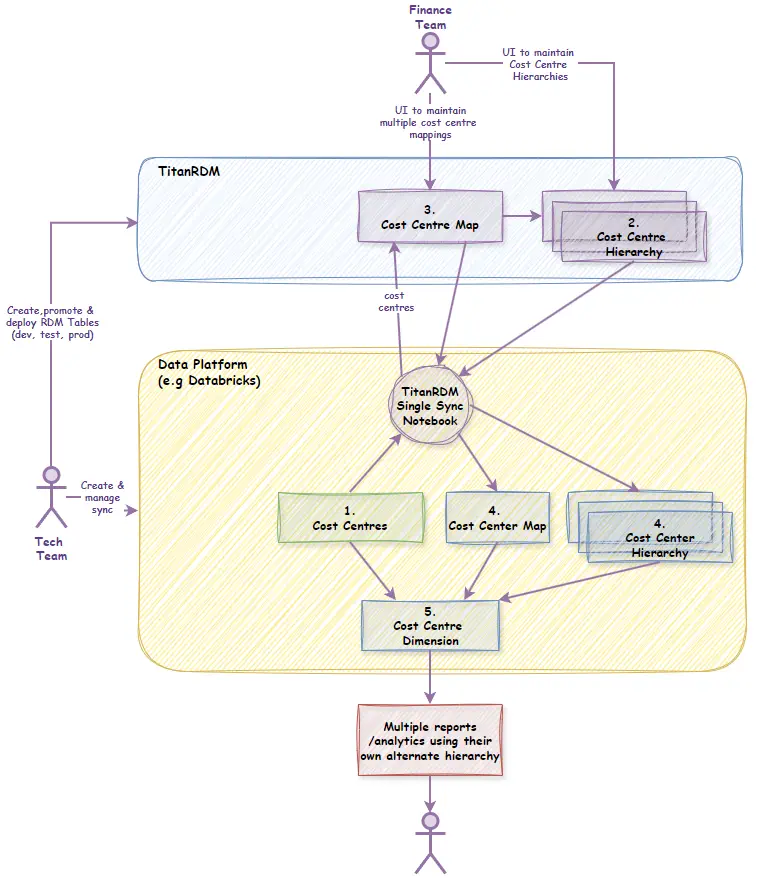
- TitanRDM provides a sync SDK that uses conventions to push and pull data to and from TitanRDM. A single notebook can sync all datasets from and to TitanRDM. Your Cost Center should already exist on your data platform. The sync pushes and merges Cost Centre changes to the "Cost Centre Map" table in TitanRDM. This ensures that any new Cost Centers are available for mapping, and old Cost Centers are soft deleted.
- The finance team maintain multiple "Cost Centre hierarchy" tables which contain one row for each node in the hierarchy tree. One "Cost Centre hierarchy" table for each alternative hierarchy. i.e. one for the Geographical hierarchy, one for Business Unit hierarchy etc. Most likely these hierarchy tables also have their own internal parent-child or natural hierarchies.
- The finance team also manages the mapping of Cost Centre to each Hierarchy in the "Cost Centre Map" table. The "Cost Centre Map" table is list of Cost Centre codes and descriptions, augmented with hierarchy columns, one for each alternate hierarchy. Each hierarchy column maps to a separate "Cost Centre Hierarchy" table. This enforces validity and referential integrity. For parent-child ragged hierarchies, the hierarchy column would just self reference the "Cost Centre hierarchy" table.
- The TitanRDM sync process also pulls changes from the TitanRDM "Cost Centre Map" and "Cost Centre Hierarchy" tables back to a copy on the data platform.
- Once the hierarchies data is synced back to the data platform, the data platform has all the data need to create a Cost Centre dimension complete with multiple alternate hierarchies.
- Report developers and data analysts can choose the Cost Centre hierarchy appropriate for their use case. ## Comparison of approaches
| Approach | Versioning | Business-user ownership | Validation | API consumption |
| Spreadsheet | None | Yes, fragile | Manual | CSV export |
| Hard-coded SQL | Git history | No | None | None |
| MDM platform | Full | Yes | Yes | Heavy |
| TitanRDM | Full | Yes | Yes | Yes |
Spreadsheets and SQL don't scale past the first reorg. MDM platforms solve the problem but need significant implementation effort and licensing costs. For teams that need governed, versioned hierarchies with business-user ownership and API/SDK consumption, a purpose-built tool like TitanRDM sits between spreadsheet chaos and full MDM. Business users maintain rollups with audit trails, and pipelines consume them programmatically.
FAQ
Can one Cost Centre belong to multiple hierarchies? Yes. A Cost Centre can roll up to a geographic, business-unit, and legal-entity parent simultaneously. Bridge tables handle this.
How do you handle hierarchy changes in a data warehouse? End-date the old parent-child relationship and create a new one with an effective date. Use SCD Type 2 to preserve historical accuracy.
What is a ragged hierarchy? One where not all branches have the same depth. A Cost Centre might roll up to a region then a country, or directly to a country.