Deployments
Available to: Developers, Admins Minimum plan: Free
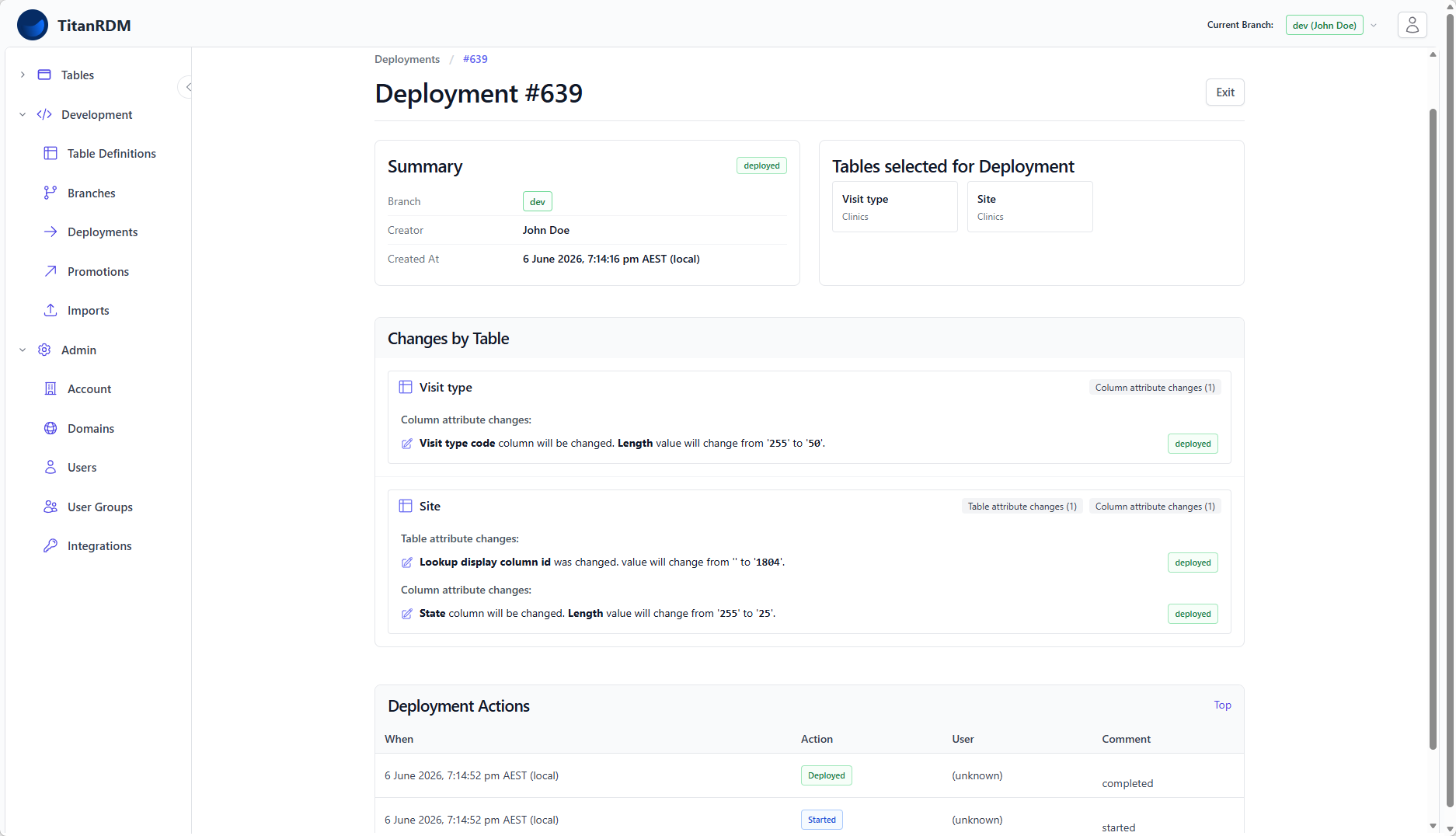
A deployment takes the table definitions on a branch and applies them to the physical database — creating new tables or altering existing ones. Until you deploy, changes to table definitions are metadata only and do not affect the actual data tables.
Why Deploy?
TitanRDM deliberately separates defining a table from creating it. This gives you a review step between making a change and applying it:
- You can add, rename, or remove columns on a table definition without any risk to live data
- You can review exactly what will change before it takes effect
- Multiple table changes can be batched into a single deployment
- If something goes wrong, the deployment fails cleanly without leaving the database in a partial state
The Deployment Lifecycle
A deployment moves through these statuses:
Created → Deployed
           ├── Failed → (Retry)
           ├── Rejected
           └── Abandoned
           └── Deployed
| Status | Meaning |
|---|---|
| Created | The deployment has been prepared and is ready for review. No changes have been applied yet. |
| Deployed | All changes were successfully applied to the database. |
| Failed | One or more changes could not be applied. The deployment can be retried. |
| Rejected | An approver reviewed the deployment and rejected it. |
| Abandoned | The deployment was cancelled without being applied. |
Creating a Deployment
- Navigate to Development > Deployments
- Click New Deployment
- TitanRDM scans your current branch for table definitions that have changed since their last deployment
- Select the tables you want to include in this deployment (or deploy all)
- Review the changes
The Diff Review
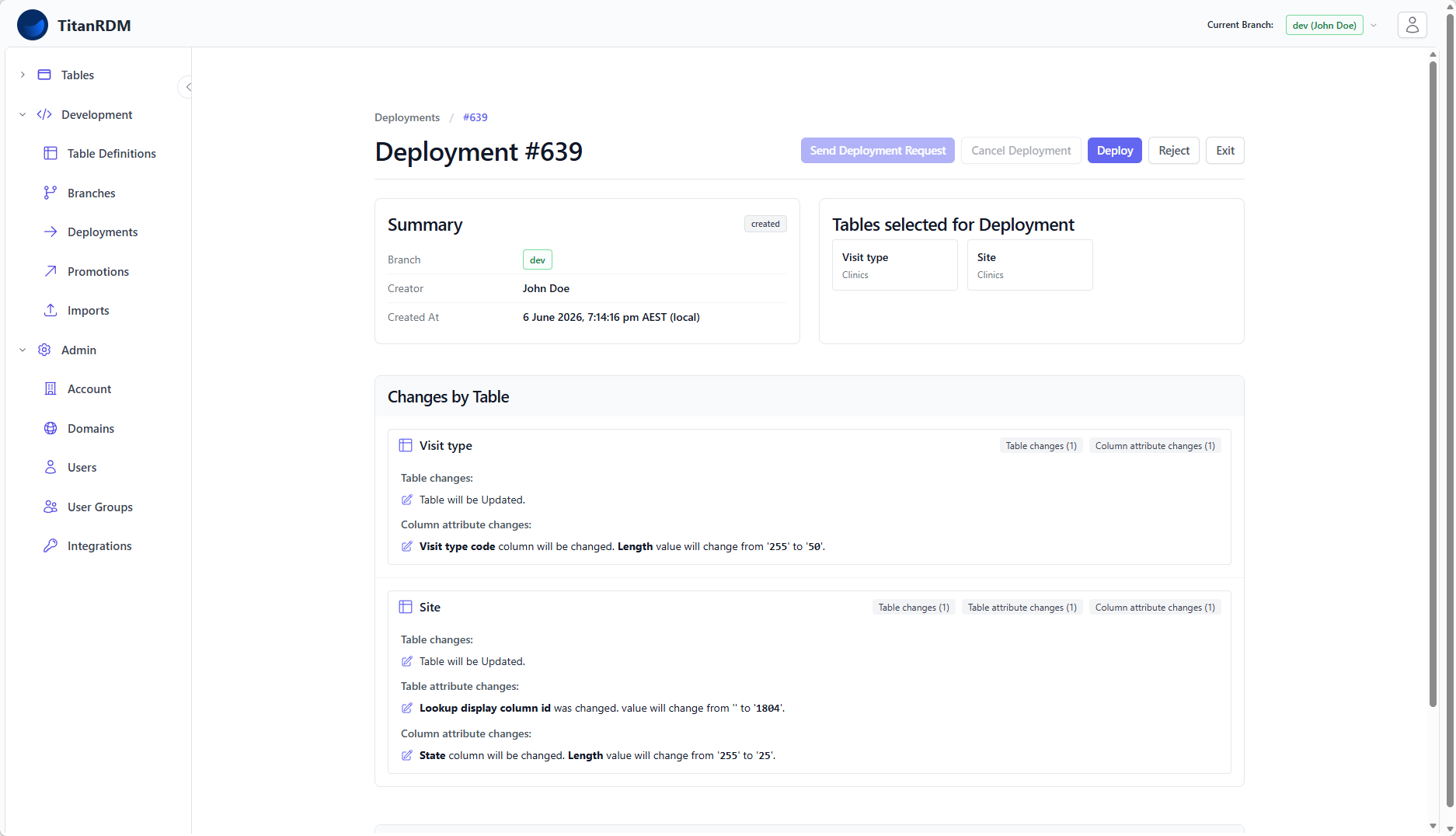
Before deploying, TitanRDM shows you a detailed diff of every change that will be applied. The diff is organised into four levels:
| Diff Level | What It Shows |
|---|---|
| Table changes | New tables being created, existing tables being updated |
| Table attribute changes | Changes to table-level properties: name, database table name, domain, description, load type, lookup display column |
| Column changes | New columns being added, existing columns being updated, or columns being removed |
| Column attribute changes | Changes to column-level properties: name, data type, primary key, foreign key, length, scale |
Each change shows the old value and new value side by side, so you can verify exactly what will happen.
Deploying
Once you have reviewed the changes:
- Click Deploy
- TitanRDM executes the changes against the physical database
What Happens During Deployment
For each table in the deployment, TitanRDM generates and executes SQL statements:
New tables:
- CREATE TABLE with all defined columns
- System columns are added automatically (trdm_sk, trdm_created_at, trdm_updated_at, trdm_updated_by, trdm_is_deleted)
- Primary key constraints are created
- A DeployedTableDefinition and DeployedColumnDefinition records are created to track the deployed state
Updated tables:
- ALTER TABLE statements for each column change (add, rename, change type, drop)
- Constraint modifications as needed
- The deployed definition records are updated to match
Dependency Ordering
TitanRDM automatically orders table changes based on foreign key dependencies. If Table A references Table B via a foreign key, Table B is deployed first. This prevents errors from referencing tables that do not yet exist.
Deployment Actions
Every deployment records an audit trail of actions:
| Action | When |
|---|---|
| Created | When the deployment is first prepared |
| Started | When the deploy button is clicked |
| Deployed | When all changes are successfully applied |
| Failed | If an error occurs during deployment |
| Rejected | If an approver rejects the deployment |
| Abandoned | If the deployment is cancelled |
These actions include timestamps and the user who performed them, providing a complete audit trail.
Handling Failures
If a deployment fails:
- The error message is displayed on the deployment detail page
- The deployment status changes to Failed
- You can fix the underlying issue (e.g., correct a column definition) and click Retry
- Or you can Abandon the deployment and create a new one
Common failure causes:
- A column type change that is incompatible with existing data (e.g., changing varchar to integer when non-numeric data exists)
- A foreign key reference to a table that has not been deployed yet
- A naming conflict with an existing database object
Deployment vs Promotion
It is important to understand the distinction:
| Deployment | Promotion | |
|---|---|---|
| What it does | Applies table definitions to the physical database on the current branch | Copies table definitions from one branch to another |
| When to use | After creating or modifying table definitions | After deploying and testing on one branch, to move changes to the next environment |
| Scope | One branch | Between two branches (source → target) |
A typical workflow: 1. Create a new table on a Private Developer branch, or clone an existing table from a higher environment (Test/Prod) branch. 2. Make your changes 3. Deploy on Private Development (creates/alters physical tables on Dev) 4. Promote from Private Development to Test (copies definitions) 5. Deploy on Test (creates/alters physical tables on Test) 6. Promote from Test to Production 7. Deploy on Production
Deleting Tables
TitanRDM provides a safe removal process for table definitions on the table definitions index page. When you remove a table, the physical database table is renamed (not dropped). See the Removing a Table page for more details.
Related Pages
- Promoting Changes — moving definitions between branches
- Table Definitions — what gets deployed
- Branches — the environments you deploy to
- Your First Table — includes a deployment walkthrough
- Removing a Table — safe table removal process
- Branch Cloning — pulling existing table definitions from a higher environment branch