Foreign Keys/ Lookup Tables
Available to: Developers, Admins Minimum plan: Free
A foreign key or (Lookup Table) in TitanRDM links a column in one table to another table, creating a relationship between them. In the data grid, foreign key columns display a lookup dropdown that shows values from the referenced table — making it easy for users to select valid references without memorising codes.
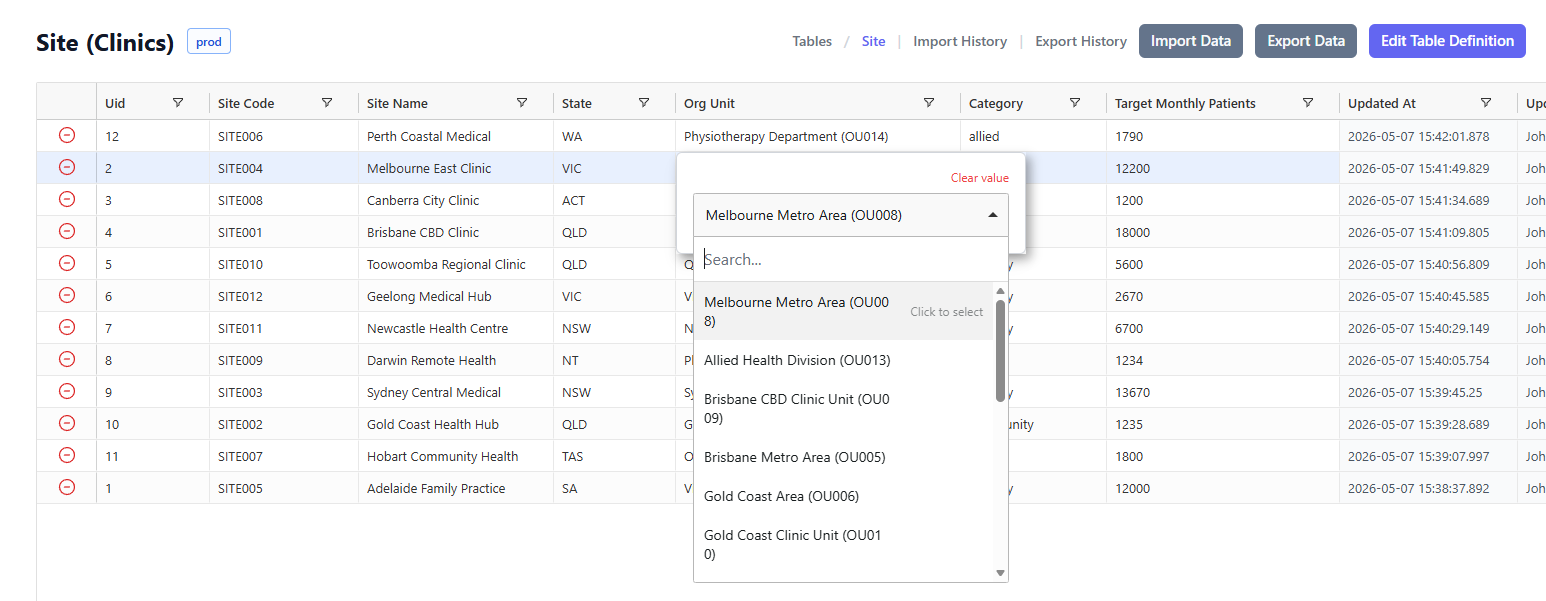
How Foreign Keys Work
A column becomes a foreign key when a developer selects a referenced table in Lookup Table column of the Column Definition editor:
- In the data grid — the column shows a dropdown when editing. The dropdown displays:
- The primary key value of the referenced table (what gets stored)
- The lookup display column value (a human-readable label shown alongside)
- During deployment — TitanRDM orders table deployments by dependency, ensuring referenced tables exist before tables that reference them
- During promotion/clone — foreign key references are re-pointed to the equivalent table on the target branch (matched by table key)
- During removal — you cannot remove a table that is referenced by other active tables
Setting Up a Foreign Key/Lookup Table
Step 1: Ensure the Referenced Table Exists
The table you want to reference must: - Exist as a table definition on the same branch - Have at least one primary key column defined - Ideally have a lookup display column set (for a user-friendly dropdown label)
Step 2: Mark the Column as a Foreign Key/Lookup Table
- Navigate to Development > Table Definitions
- Open the table definition that will contain the foreign key
- Find the column that should reference another table (or add a new column)
- In the Lookup Table column of the grid, select the referenced table from the dropdown
- Save
The dropdown lists all table definitions on your current branch, formatted as Table Name (Domain).
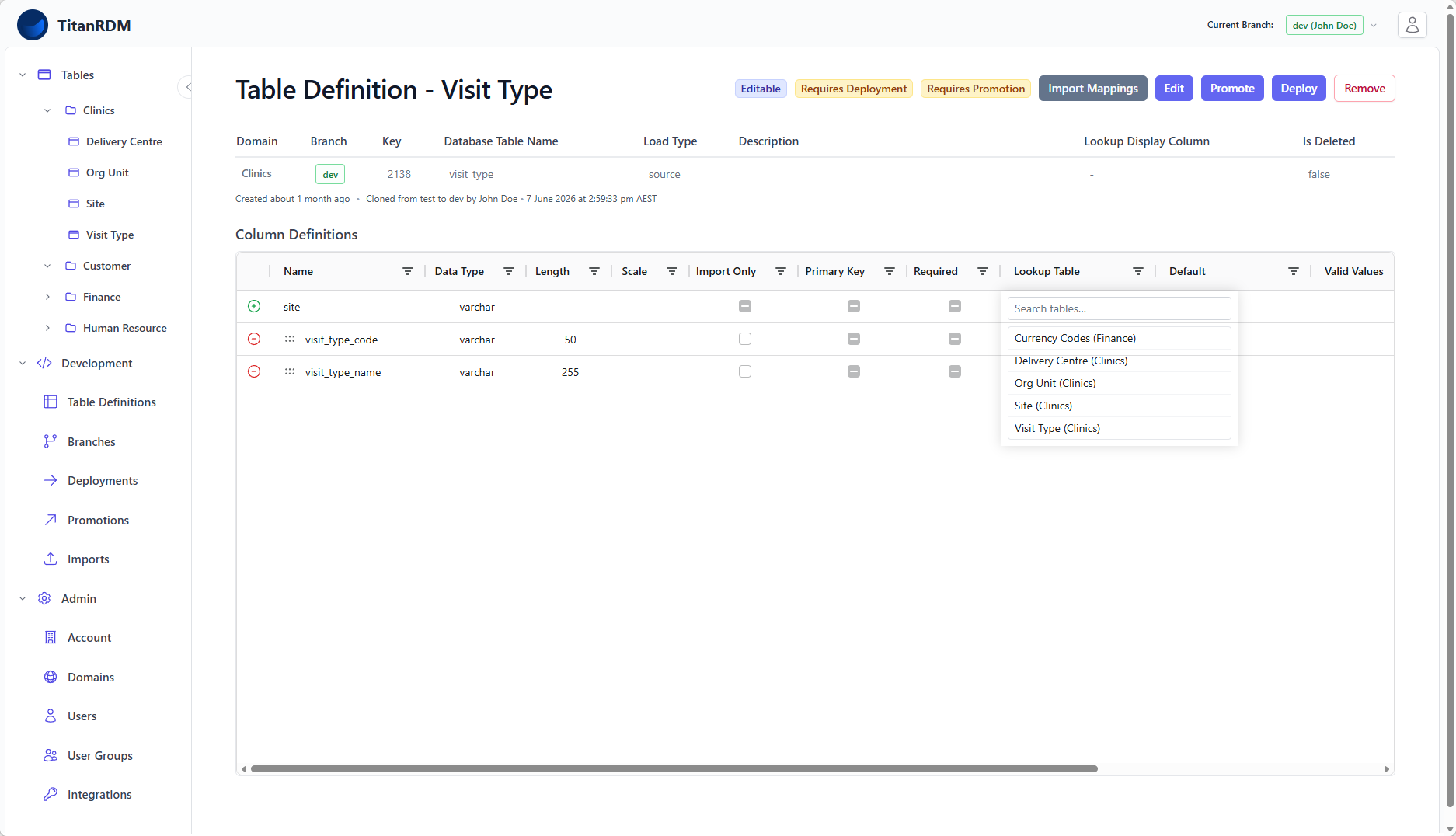
Step 3: Set the Lookup Display Column (on the referenced table)
For the best user experience in the data grid:
- Open the referenced table definition (the one being pointed to)
- Click Edit
- Set the Lookup Display Column to a descriptive column (e.g.,
nameordescription) - Save
When users edit the FK column in the data grid, they will see this display column's values in the dropdown alongside the primary key.
Example
Consider two tables:
Country Codes (referenced table):
| Column | Type | PK | Notes |
|---|---|---|---|
| country_code | varchar(3) | ✓ | Primary key (e.g., AUS, USA, GBR) |
| country_name | varchar(100) | Lookup display column (e.g., Australia, United States) |
Customer Locations (referencing table):
| Column | Type | Lookup Table | Notes |
|---|---|---|---|
| location_id | integer | Primary key | |
| location_name | varchar(100) | ||
| country | varchar(3) | → Country Codes | Foreign key |
When editing the country column in the Customer Locations data grid, users see a dropdown showing:
AUS - Australia
GBR - United Kingdom
USA - United States
...
The primary key value (AUS) is stored in the column. The display column value (Australia) is shown for readability.
Foreign Key/Lookup Table Constraints
Unlike traditional database foreign keys, TitanRDM's foreign keys are soft references — they do not create database-level constraints. This means:
| Behaviour | Description |
|---|---|
| No cascade delete | Deleting a row in the referenced table does not affect rows in referencing tables |
| No enforcement on save | You can store a value that does not exist in the referenced table (though the dropdown only shows valid values) |
| Deployment ordering | TitanRDM ensures referenced tables are deployed before referencing tables |
| Removal blocking | You cannot remove a table that is actively referenced by other tables' FK columns |
The primary purpose of foreign keys in TitanRDM is to provide a convenient lookup UI and to manage deployment ordering — not to enforce strict relational integrity.
Foreign Key/Lookup Table Across Branches
Foreign key references are stored as a pointer to a specific table definition ID. When table definitions are promoted or cloned between branches:
- TitanRDM identifies the referenced table by its key (a stable identifier)
- On the target branch, it finds the table definition with the same key
- The FK column's reference is re-pointed to the target branch's version
If the referenced table does not exist on the target branch: - During clone — an error message is shown prompting you to clone the referenced table into the target branch first, or include it along with the table being cloned - During promotion — the promotion is blocked with a validation error, prompting you to promote the referenced table first
Self-References
A table can reference itself via a foreign key. This is useful for hierarchical data (e.g., a parent_category column that references the same Categories table). Self-references are excluded from removal validation checks — you can remove a table that only references itself.
Multiple Foreign Keys
A table can have multiple foreign key columns, each referencing different tables (or the same table). There is no limit on the number of FK columns per table.
Impact on Data Operations
| Operation | FK Behaviour |
|---|---|
| Data grid editing | Lookup dropdown appears for FK columns |
| Data import | FK values are imported as-is (no validation against the referenced table) |
| Data export | FK column exports the stored value (not the display value) |
| Deployment | Referenced tables deployed first |
| Promotion/Clone | FK references re-pointed to target branch |
| Remove/Delete | Blocked if other tables reference this table |
Troubleshooting
| Problem | Cause | Solution |
|---|---|---|
| FK dropdown is empty | Referenced table has no deployed data, or no primary key column defined | Deploy the referenced table and ensure it has data and a PK column |
| FK dropdown shows codes only (no descriptions) | Lookup display column not set on the referenced table | Edit the referenced table definition and set the Lookup Display Column |
| Cannot clone table — missing reference error | The referenced table does not exist on the target branch | Clone the referenced table first, then clone the referencing table |
| Cannot remove table — referenced by other tables | Other active tables have FK columns pointing to this table | Remove the referencing tables first, or remove the FK references from their column definitions |
Related Pages
- Creating Tables — defining columns including FK setup
- Column Types Reference — data types for FK columns
- Editing Data — how FK lookups work in the data grid
- Cloning Tables — how FKs are handled during clone
- Deployments — dependency ordering during deployment