Plans and Tiers
Available to: All users (view); Admins (change plan) Minimum plan: Free
TitanRDM offers four plans designed to scale with your team — from a free tier for small teams getting started, through to enterprise plans for large organisations with custom requirements.
Plan Overview
| Free | Plus | Business | Enterprise | |
|---|---|---|---|---|
| Monthly platform fee | $0 | $90/mo | $280/mo | Custom |
| Included seats | 1 dev + 2 end users | 1 dev + 2 end users | 1 dev + 2 end users | Custom |
| Additional Developer | — (max 1) | $20/user/mo | $20/user/mo | Custom |
| Additional End User | — (max 2) | $10/user/mo | $10/user/mo | Custom |
Every plan includes 1 developer and 2 end users at no extra cost. Paid plans (Plus and Business) add a flat monthly platform fee and let you add unlimited additional developer and end user seats — you are only charged for seats above the included allocation. The Free plan is capped at 1 developer and 2 end users.
Feature Comparison
| Feature | Free | Plus | Business | Enterprise |
|---|---|---|---|---|
| Core RDM editing (data grid) | Yes | Yes | Yes | Yes |
| SDK and API access | Yes | Yes | Yes | Yes |
| Dev/Test/Prod branching | Yes | Yes | Yes | Yes |
| Promotions and approvals | Yes | Yes | Yes | Yes |
| Full audit trail | Yes | Yes | Yes | Yes |
| Granular RBAC | Yes | Yes | Yes | Yes |
| Single Sign-On (SSO) | — | — | Yes | Yes |
| Dedicated compute | — | — | — | Yes |
| Dedicated support | — | — | — | Yes |
| Custom integrations | — | — | — | Yes |
All plans share the same core feature set — including Dev/Test/Prod branching, promotions and approvals, the full audit trail, and granular RBAC. The plans differ in their usage allowances and seat pricing. Single Sign-On (SSO) is the only feature exclusive to Business and Enterprise.
What Each Tier Unlocks
Free — The full TitanRDM feature set for small teams getting started: Dev/Test/Prod branching, promotions and approvals, the full audit trail, and granular RBAC. Includes 1 developer and 2 end users at no cost. No payment details required.
Plus — The first paid tier. Same features as Free with higher usage allowances and the ability to add unlimited additional seats beyond the included 1 developer and 2 end users. A low-cost way to grow your team and resource allowances.
Business — Aimed at organisations with larger resource needs. Adds Single Sign-On (SSO) plus the highest usage allowances. Includes everything in Plus.
Enterprise — Custom limits, dedicated compute, dedicated support, custom integrations, annual billing, and negotiated pricing. Contact sales@titanrdm.com.
Usage Allowances
Each plan includes flat-tier allowances for storage, SDK runs, and API calls:
| Dimension | Free | Plus | Business | Enterprise |
|---|---|---|---|---|
| Storage | 500 MB | 5 GB | 15 GB | Custom |
| SDK Import/Export runs | 100/mo | 3,000/mo | 9,000/mo | Custom |
| API calls | 1,000/mo | 15,000/mo | 45,000/mo | Custom |
What Counts as Usage
- Storage — the total size of your account's database, including all branches and deployed tables
- SDK Import/Export runs — each import or export job triggered via the API counts as one run
- API calls — each authenticated request to the REST API v1
What Happens at the Limit
When you approach your usage limits:
| Threshold | What Happens |
|---|---|
| 75% | Email alert sent to account admins |
| 90% | Email alert sent to account admins with upgrade/overage CTAs |
| 100% | Email alert sent to account admins; if overage is not enabled: SDK runs fail gracefully, API calls return 429 Too Many Requests, storage uploads are blocked |
| 100% | If overage is enabled: usage continues and is billed on the next invoice |
Overage Billing
On Plus and Business plans, you can opt in to overage billing to avoid hard caps:
| Dimension | Overage Rate |
|---|---|
| Additional storage | $5/GB/month |
| Additional SDK runs (per 1,000) | $10/month |
| Additional API calls (per 10,000) | $10/month |
Overages are opt-in only — TitanRDM never charges overage fees without your explicit consent. You can enable or disable overage billing from the Usage Dashboard.
Note: Free plan accounts cannot enable overage billing. Upgrade to Plus or Business first.
User Licence Types
Every user in TitanRDM has one of two licence types, which determines both their capabilities and their billing rate:
| Licence Type | Capabilities | Billing |
|---|---|---|
| Developer | Full platform access: table definitions, branches, deployments, promotions, imports/exports, SDK/API, admin functions (if granted) | Higher per-seat price |
| End User | View and edit data in tables. Cannot access table definitions, branches, deployments, imports, or admin functions. | Lower per-seat price |
Tip: Assign the End User licence to team members who only need to view or edit data. This keeps your costs down while giving them full data access.
Changing Plans
Account administrators can change plans at any time:
- Navigate to Admin > Account
- Click Subscription
- Click Change Plan
- Confirm the change
Upgrading
When you upgrade: - Higher usage allowances take effect immediately - Upgrading to Business enables Single Sign-On (SSO) setup - Your Dev/Test/Prod branches are unchanged — all plans already have the same branch structure - Billing is prorated — you only pay the difference for the remainder of your current billing period
Downgrading
When you downgrade, a confirmation page shows exactly what will be affected before you proceed.
What happens to features: - Because Free, Plus, and Business share the same core features (branching, promotions, audit trail, RBAC), downgrading between them does not remove any of these features or delete any branch data - Downgrading from Business to Plus or Free disables Single Sign-On (SSO): your SSO configuration is removed and all users will sign in via magic link instead. You are warned about this on the confirmation page before you proceed. - Usage allowances are reduced to the lower plan's limits
What happens to data: - Your branches (Production, Test, Development) and all their data are retained — nothing is deleted when moving between Free, Plus, and Business - Production branch data is never affected
Downgrading to Free — seat limits: - The Free plan is capped at 1 developer and 2 end users. If your account currently exceeds these limits, you must remove the extra users before you can downgrade to Free.
When the change takes effect: - Business to Plus (paid-to-paid) — takes effect immediately; billing is prorated - Plus or Business to Free (paid-to-free via Stripe) — your subscription is scheduled for cancellation; you keep your current plan's features until the end of your billing period, then the downgrade is applied automatically - Any downgrade without an active Stripe subscription — takes effect immediately
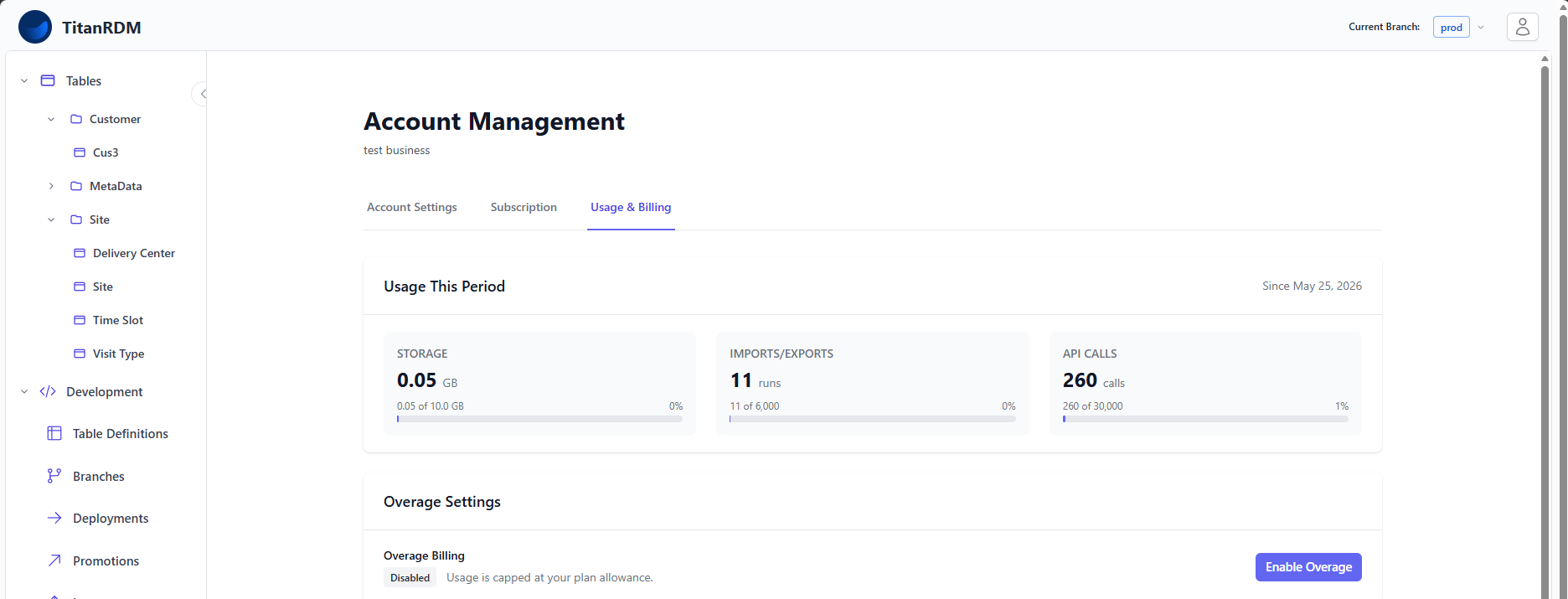
Usage & Billing Dashboard
The Usage Dashboard provides a real-time view of your account's consumption:
- Seats — developer and end user counts against plan limits
- Storage — current database size against plan allowance
- SDK Runs — import/export runs this billing period against plan allowance
- API Calls — API requests this billing period against plan allowance
- Overage toggle — enable or disable automatic overage billing
Access the Usage & Billing Dashboard from Admin > Account (Usage tab) or from the dashboard quick shortcuts.
Stripe Billing Portal
TitanRDM uses Stripe for billing. Account administrators can access the Billing Portal to:
- Update payment methods
- View and download invoices
- View payment history
- Manage subscription details
Access the Stripe Billing Portal from Admin > Account > Subscription or Billing Portal from the dashboard's Plan & Billing section.
- Click Manage Plan. You will be redirected to the Stripe portal.
Related Pages
- Signing Up — choosing a plan during registration
- Branches — multi-environment workflows (all plans)
- Promotions — approval workflows (all plans)
- Single Sign-On — SSO setup (Business/Enterprise)
- Billing and Usage — detailed billing management guide